Different Shapes in One Collection: the Polymorphic Pattern
Bikes, helmets and lights can share one products collection, each with the fields every product has, its own fields, and a type field that says which kind it is, so one query can search them all and another can pick out one kind.
Journeyman · MongoDB · Updated
After this lesson you can
- Store products of different kinds in one collection with shared fields, their own fields and a type field, the polymorphic pattern
- Query a polymorphic collection by type, by a shared field, and by a field only one kind has
Key takeaways
- The polymorphic pattern keeps things of different kinds in one collection when the app mostly uses them together, as a store does with its products.
- Every document holds the shared fields (here type, name and price) plus only the fields its own kind needs.
- A type field says which kind a document is, so a query can pick one kind and the app knows which fields to expect.
- A filter on a field only one kind has skips every document without that field, the way a missing field always does.
- A question across kinds names each kind's field, joined with $or.
A store sells things that aren't alike: a bike has frame sizes and gears, a helmet has head sizes, a light has a brightness. Yet its search box, its "gifts under $50" shelf and its cart want them all together. Sports teams with players and coaches, a library with books and films, a feed with posts, photos and polls: you'll use this lesson whenever an app keeps different kinds of things that it mostly shows side by side.
The examples use Riverbend's catalog from Copying a Few Fields: the Extended Reference Pattern. In mongosh, after use riverbend, load it again first:
load("riverbend-catalog.js")
true
Three collections, or one?
Riverbend could keep bikes, helmets and lights in three collections. Then "everything under $50" is three queries, and the app has to merge three lists and sort them again. A cart holds products of every kind, so each line would also need to say which collection to look in.
A spreadsheet has the opposite problem: one sheet with a column for every field of every kind. A helmet's row has empty cells for frame sizes, gears, lumens and mount; a bike's row has empty cells for head sizes and lumens. Most of the sheet is empty, and every new kind of product adds more columns.
Documents don't need either. A document only holds the fields someone put in it, so one collection can hold all three kinds, each with exactly the fields it needs.
Shared fields and their own fields
Here's one product of each kind, leaving out the photos and categories:
db.products.find({ _id: { $in: [102, 103, 105] } }, { photos: 0, categoryIds: 0 })
[
  {
    _id: 102,
    type: 'bike',
    name: 'Canal City Bike',
    price: 649,
    frameSizes: [ 'S', 'M', 'L' ],
    gears: 7
  },
  {
    _id: 103,
    type: 'helmet',
    name: 'Harbor Helmet',
    price: 59,
    headSizes: [ 'M', 'L' ]
  },
  {
    _id: 105,
    type: 'light',
    name: 'Beacon Front Light',
    price: 35,
    lumens: 400,
    mount: 'front'
  }
]
Every product has the shared fields a store page shows for anything: type, name and price (and the categoryIds and photos from Model for the Questions Your App Asks). Then each kind has its own fields: a bike's frameSizes and gears, a helmet's headSizes, a light's lumens (how bright it is) and mount. The type field says which kind a document is, so the app knows which fields to expect: a size picker for a bike's frame, a brightness label for a light.
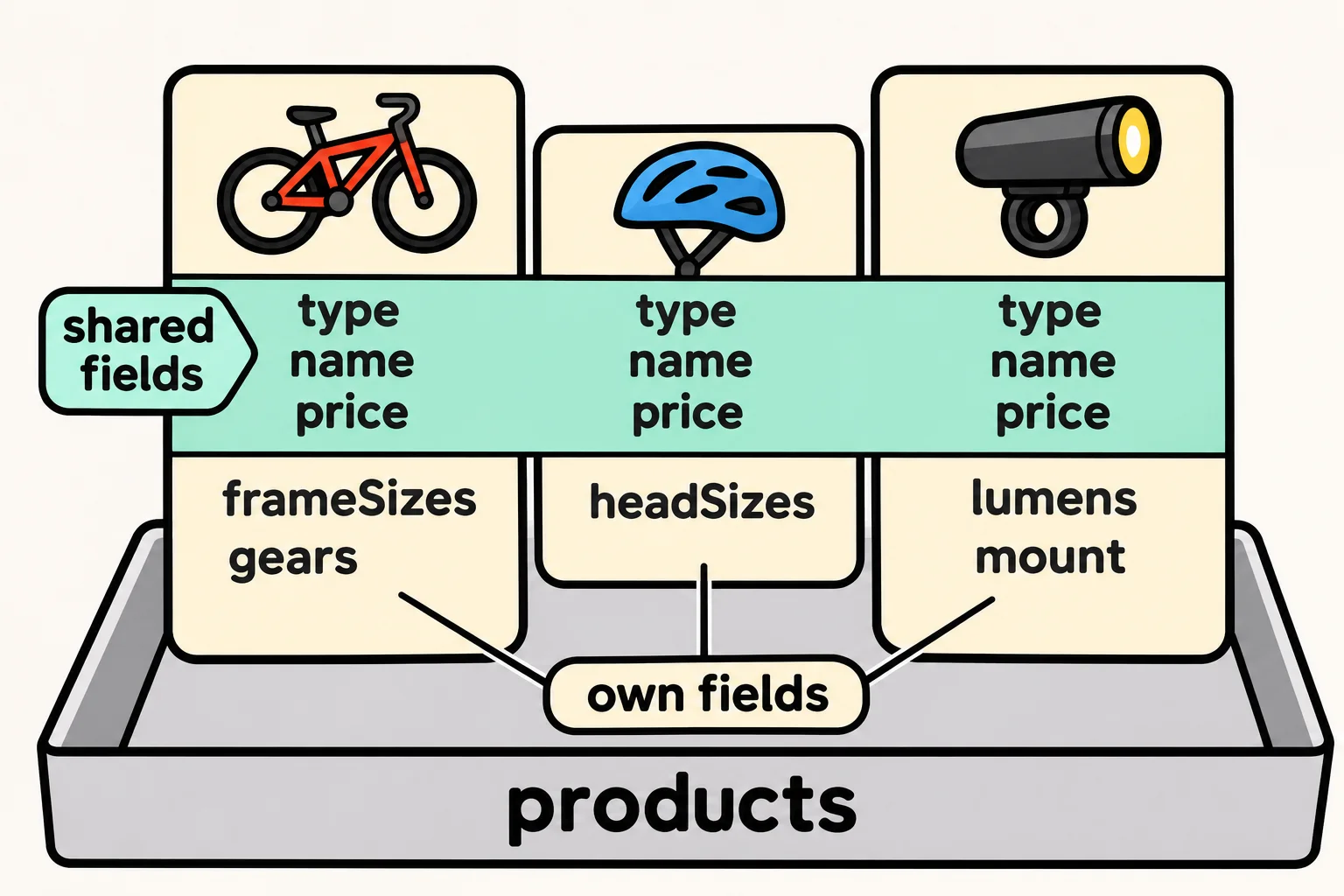
One collection holding documents of different shapes, told apart by a field like type, is the polymorphic pattern. Polymorphic means "many shapes" (poly is "many", morph is "shape").
One query for every kind
A question about the shared fields covers every kind at once. Here's the "gifts under $50" shelf:
db.products.find({ price: { $lt: 50 } }, { type: 1, name: 1, price: 1 })
[
  { _id: 105, type: 'light', name: 'Beacon Front Light', price: 35 },
  { _id: 106, type: 'light', name: 'Beacon Rear Light', price: 25 },
  { _id: 107, type: 'helmet', name: 'Junior Helmet', price: 39 },
  { _id: 108, type: 'light', name: 'Beacon 800 Front Light', price: 49 }
]
A helmet, three lights and nothing more: one query, one list, no merging.
One kind, or one kind's field
type picks out one kind. The helmet page lists every helmet with its sizes:
db.products.find({ type: "helmet" }, { name: 1, headSizes: 1 })
[
  { _id: 103, name: 'Harbor Helmet', headSizes: [ 'M', 'L' ] },
  { _id: 104, name: 'Summit Helmet', headSizes: [ 'S', 'M', 'L' ] },
  { _id: 107, name: 'Junior Helmet', headSizes: [ 'S' ] }
]
A filter on a field only one kind has skips every document without that field, as Missing Fields, null and $exists showed. Here are the lights of 400 lumens or more:
db.products.find({ lumens: { $gte: 400 } }, { name: 1, lumens: 1 })
[
  { _id: 105, name: 'Beacon Front Light', lumens: 400 },
  { _id: 108, name: 'Beacon 800 Front Light', lumens: 800 }
]
That works today, but write type: "light" into the filter anyway: next year Riverbend may sell a bike with a light built in, with its own lumens. The filter then still says what you mean.
A question that crosses kinds names each kind's own field. "Everything that comes in size M" means a bike with an M frame or a helmet with an M head size, joined with $or from Combining Conditions: $and, $or and $not:
db.products.find({ $or: [ { frameSizes: "M" }, { headSizes: "M" } ] }, { type: 1, name: 1 })
[
  { _id: 101, type: 'bike', name: 'Riverbend Road 2' },
  { _id: 102, type: 'bike', name: 'Canal City Bike' },
  { _id: 103, type: 'helmet', name: 'Harbor Helmet' },
  { _id: 104, type: 'helmet', name: 'Summit Helmet' }
]
Two bikes and two helmets. Because type is in almost every filter, it's also the field Module 4 starts its indexes with, to make these queries fast. And because each kind has its own required fields, the next lesson, Schema Validation with $jsonSchema, adds rules such as "every bike has frame sizes".
Check yourself
2 questions to try on the lesson page.
So what
Bikes, helmets and lights now live together the way the store shows them: one query for the whole shop, one filter for one kind, and a type field that tells the app what each document holds.