Upserts and Replacing a Whole Document
An upsert updates a document when the filter finds one and inserts it when it doesn't, $setOnInsert sets values only on that first insert, replaceOne swaps in a whole new version, and findOneAndUpdate changes a document and hands it back.
Journeyman · MongoDB · Updated
After this lesson you can
- Save a document whether or not it exists yet with upsert set to true, and keep first-time values with $setOnInsert
- Choose between updateOne, replaceOne and findOneAndUpdate, and predict which fields replaceOne leaves out
Key takeaways
- With upsert set to true, an update changes the document the filter finds, or inserts a new one when it finds none.
- A document an upsert inserts gets the filter's exact values as well as the update's fields.
- $setOnInsert sets a field only when the upsert inserts, so a later save never resets it.
- replaceOne swaps the whole document for a new version. Every field the new version leaves out is gone; the _id stays.
- findOneAndUpdate changes one document and gives it back, as it was before or, with returnDocument after, as it is now.
A settings page, a weekly planner, a shopping cart: the first time someone taps Save, there's nothing to update yet, and every time after that, there is. Data copied in from another system each night has the same shape of problem: some records are new and some are changes. You'll use the tools in this lesson whenever the job is "create it, or change it if it's already there".
The examples add a mealPlans collection to the sunday_kitchen database: one document per cook per week, holding the dinner planned for each day. It starts empty. The last example uses the 40 recipes from Adding Many Documents with insertMany, so in mongosh, after use sunday_kitchen, load them again first:
load("sunday-kitchen-recipes.js")
true
The first save and every save after
Maya plans Monday's dinner for week 47. An update can't save it, because there's no plan to update yet:
db.mealPlans.updateOne({ cook: "Maya", week: 47 }, { $set: { monday: "Chickpea Curry" } })
{
  acknowledged: true,
  insertedId: null,
  matchedCount: 0,
  modifiedCount: 0,
  upsertedCount: 0
}
matchedCount: 0, and nothing was saved. The next plain idea is two steps: look for the plan with findOne, then insertOne if it's missing or updateOne if it's there. That works, but it's more code, and if Maya taps Save twice quickly, both taps can look, both find nothing, and both insert: two plans for one week.
upsert: update, or insert if it isn't there
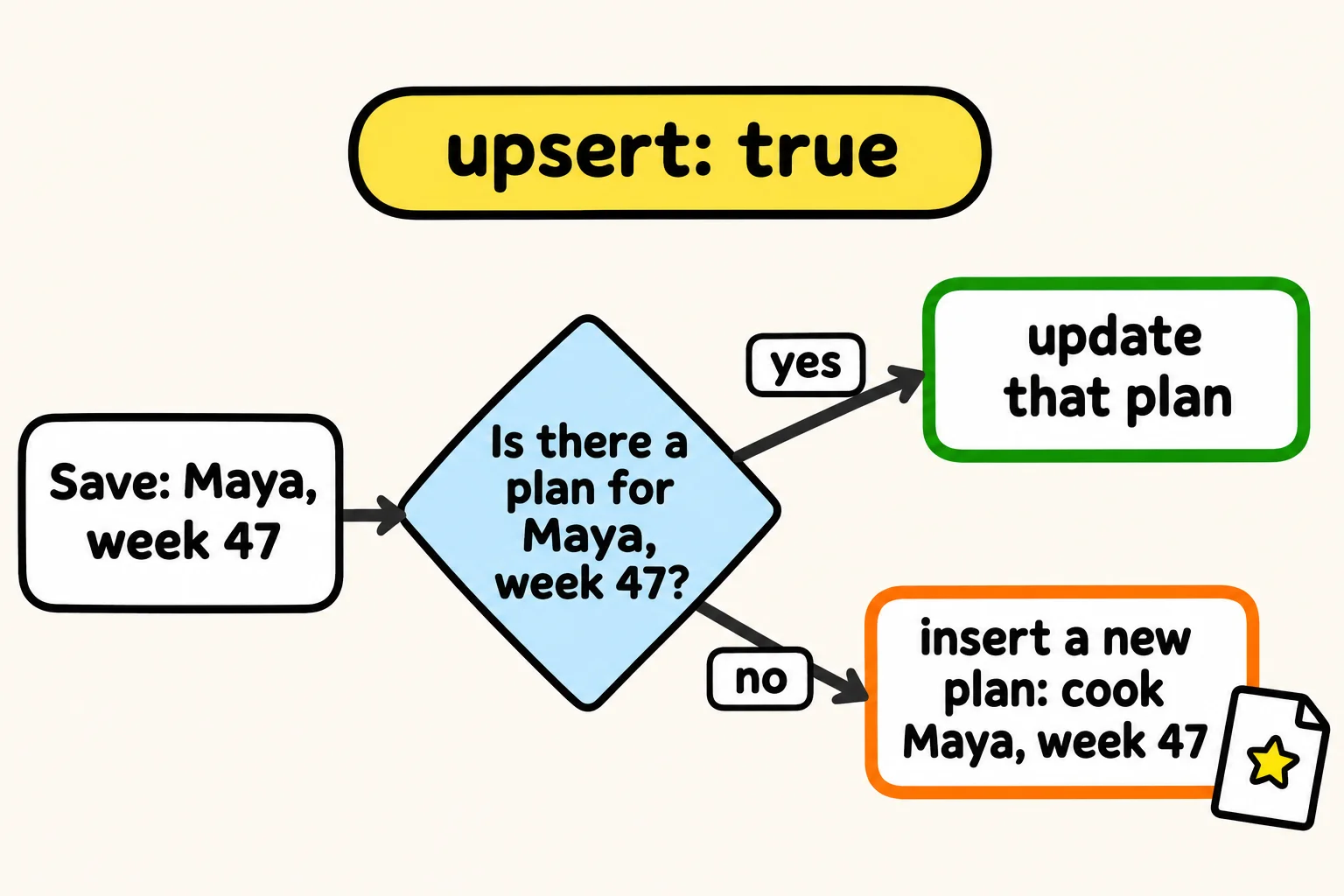
An upsert (read "up-sert", from "update" and "insert") does both steps in one. Add a third argument, the options, with upsert: true:
db.mealPlans.updateOne({ cook: "Maya", week: 47 }, { $set: { monday: "Chickpea Curry" } }, { upsert: true })
{
  acknowledged: true,
  insertedId: ObjectId('6afc9a4f4acb4a8ec8929f1b'),
  matchedCount: 0,
  modifiedCount: 0,
  upsertedCount: 1
}
upsertedCount: 1: the filter found nothing, so MongoDB inserted a new plan, and insertedId shows the ObjectId it made for it (yours will be different). The new document gets the filter's exact values, cook and week, as well as the update's:
db.mealPlans.findOne({ cook: "Maya", week: 47 }, { _id: 0 })
{ cook: 'Maya', week: 47, monday: 'Chickpea Curry' }
Your plan may show week before cook: MongoDB copies the filter's fields in no fixed order, and the order of fields never matters to a filter. Now the same save for Tuesday finds that plan and updates it, so no second plan appears:
db.mealPlans.updateOne({ cook: "Maya", week: 47 }, { $set: { tuesday: "Pad Thai" } }, { upsert: true })
{
  acknowledged: true,
  insertedId: null,
  matchedCount: 1,
  modifiedCount: 1,
  upsertedCount: 0
}
$setOnInsert: values for a new document only
A new meal plan should start at 2 servings, and a cook can change that. If every save included $set: { servings: 2 }, each save would put a cook's 4 back to 2. $setOnInsert (read "set on insert") sets its fields only when the upsert inserts:
db.mealPlans.updateOne({ cook: "Leo", week: 47 }, { $set: { monday: "Shoyu Ramen" }, $setOnInsert: { servings: 2 } }, { upsert: true })
{
  acknowledged: true,
  insertedId: ObjectId('6afc9a4f4acb4a8ec8929f1f'),
  matchedCount: 0,
  modifiedCount: 0,
  upsertedCount: 1
}
Leo's new plan has 2 servings. He changes it to 4, then saves Tuesday with the same kind of update:
db.mealPlans.updateOne({ cook: "Leo", week: 47 }, { $set: { servings: 4 } })
{
  acknowledged: true,
  insertedId: null,
  matchedCount: 1,
  modifiedCount: 1,
  upsertedCount: 0
}
db.mealPlans.updateOne({ cook: "Leo", week: 47 }, { $set: { tuesday: "Bibimbap" }, $setOnInsert: { servings: 2 } }, { upsert: true })
{
  acknowledged: true,
  insertedId: null,
  matchedCount: 1,
  modifiedCount: 1,
  upsertedCount: 0
}
db.mealPlans.findOne({ cook: "Leo", week: 47 }, { _id: 0 })
{
  cook: 'Leo',
  week: 47,
  monday: 'Shoyu Ramen',
  servings: 4,
  tuesday: 'Bibimbap'
}
The plan already existed, so $setOnInsert did nothing, and Leo's 4 servings stayed.
replaceOne: a whole new version
Sometimes the app has the complete document, such as an edit form that sends back the whole plan. replaceOne swaps the document for the one you give it, with no operators:
db.mealPlans.replaceOne({ cook: "Leo", week: 47 }, { cook: "Leo", week: 47, monday: "Pad Thai", wednesday: "Beef Tacos" })
{
  acknowledged: true,
  insertedId: null,
  matchedCount: 1,
  modifiedCount: 1,
  upsertedCount: 0
}
db.mealPlans.findOne({ cook: "Leo", week: 47 }, { _id: 0 })
{ cook: 'Leo', week: 47, monday: 'Pad Thai', wednesday: 'Beef Tacos' }
The servings and Tuesday's dinner are gone, because the new version didn't have them; only the _id is kept. Replacing beats updating when you hold the whole new version and a field left out should disappear. When you're changing a few fields, update with $set, which can't lose the others.
findOneAndUpdate: change it and see it
updateOne answers with counts. When the app needs the changed document too, such as the new save count to show on the button, findOneAndUpdate changes one document and hands it back. With returnDocument: "after", you get it as it is now; without it, as it was before the change:
db.recipes.findOneAndUpdate({ _id: 4 }, { $inc: { saves: 1 } }, { returnDocument: "after", projection: { name: 1, saves: 1 } })
{ _id: 4, name: 'Chickpea Curry', saves: 1 }
Check yourself
2 questions to try on the lesson page.
So what
"Save" is rarely only an insert or only an update. With an upsert, one call handles the first save and every save after it, and you know when a whole-document replace is what you want and when it would throw fields away.