Sessions and Cookies
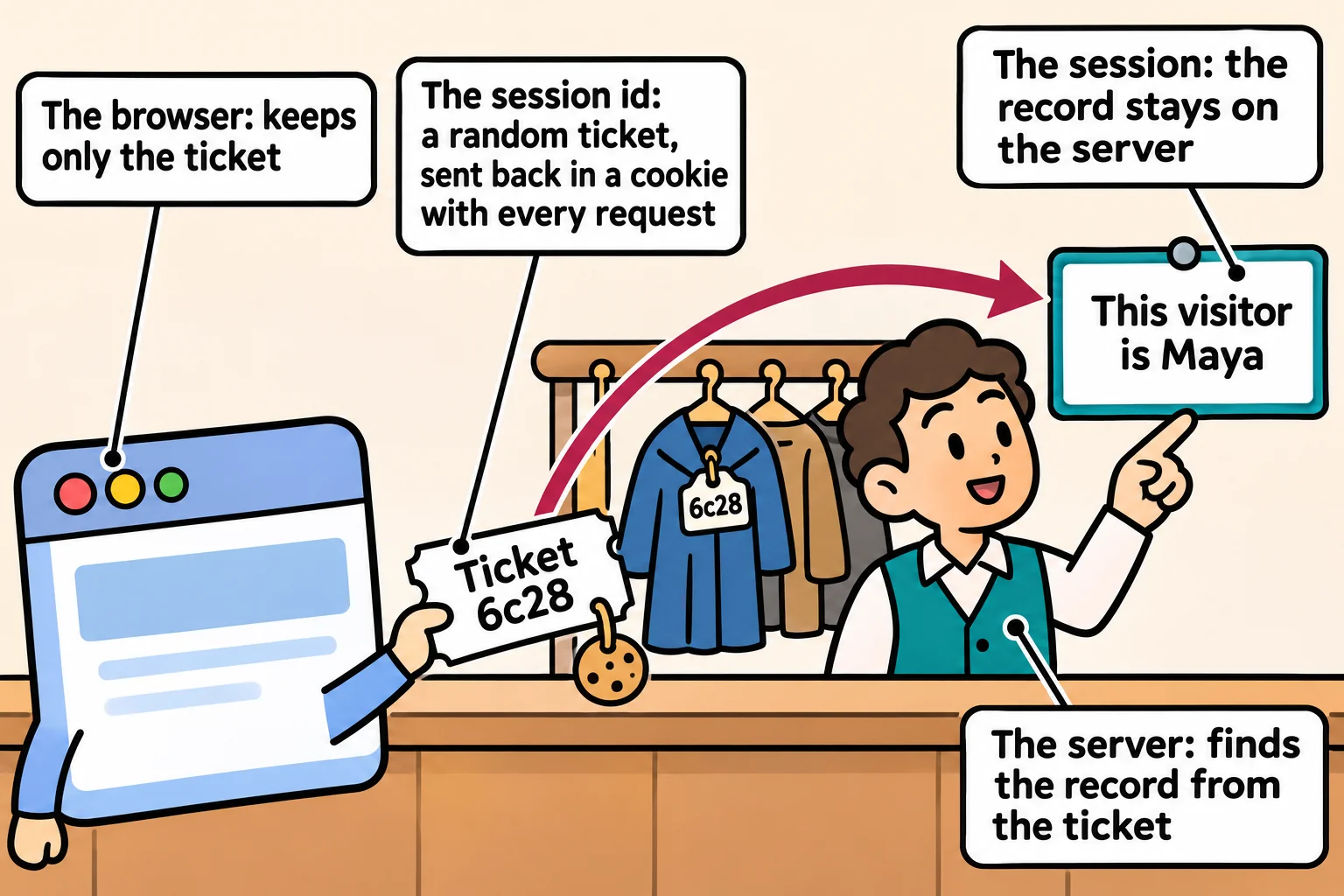
A session keeps a student signed in the way a coat check does, with the record on the server and only a random ticket in the browser's cookie, and express-session sets it up with the HttpOnly, Secure and SameSite flags; it's the simpler choice for one website on its own server.
Journeyman · Node.js · Web Development · Updated
After this lesson you can
- Explain how a session cookie keeps a person signed in, and where the session's data lives
- Set up express-session with HttpOnly, Secure and SameSite cookie flags, and sign in and out with req.session
Key takeaways
- HTTP forgets each request, so after sign-in the server hands out a ticket that every later request brings back.
- A session keeps who the visitor is on the server and gives the browser only a random session id, in a cookie the browser sends back by itself.
- express-session reads the cookie and fills req.session, so sign-in saves req.session.userId and sign-out destroys the session.
- HttpOnly keeps page scripts away from the cookie, Secure sends it only over https, and SameSite keeps other sites' requests from bringing it.
- Sessions fit one website with its own server. Their records need a store, such as MongoDB, to survive a restart or to be shared by several servers.
You sign in to your school's portal once, and it knows you on every page after that. Without that, every click would ask for your password again. Many websites keep you signed in with a session, and you'll meet sessions in any Express app that serves its own pages, from an admin page to a small shop's site.
HTTP forgets you
Each request stands on its own: HTTP is stateless, which means the server keeps no memory of one request when the next arrives. Maya signed in to the study group a second ago, but her next request, GET /me, arrives with nothing to say it's hers.
The first try is to send her email and password with every request. That puts her password on the network again and again, makes the browser keep it somewhere, and runs a slow bcrypt compare on every click. She needs something to show that isn't her password.
A coat check ticket
At a coat check, you hand over your coat once and get a numbered ticket. The coat stays behind the counter. The ticket means nothing to anyone else, and showing it gets your coat back. When you leave, the ticket is torn up.
A session is that counter. At sign-in, the server keeps a small record, this visitor is Maya, and gives the browser a random ticket, the session id. The ticket travels in a cookie: a small name and value the server sets with a Set-Cookie header. The browser stores it and sends it back, in a Cookie header, with every request to the same site, with no code on your part. The server looks the id up and finds Maya's record. Signing out throws the record away, so the old ticket stops working at once.
express-session in the study group's app
The express-session package runs the coat check for an Express app. Install it with npm install express-session@1.19.0, put SESSION_SECRET=<your-secret> in .env, and add it before the routes:
app.use(session({
  secret: process.env.SESSION_SECRET,
  resave: false,
  saveUninitialized: false,
  cookie: {
    httpOnly: true,
    secure: false, // true once the site runs on https://
    sameSite: "lax",
    maxAge: 60 * 60 * 1000, // one hour, in milliseconds
  },
}));
secret signs each ticket, so a made-up session id is refused. resave: false and saveUninitialized: false save a session only when it holds something, so a visitor who never signs in gets no cookie. Sign-in now keeps Maya's id in req.session, the record express-session finds from the cookie; /me reads it back, and sign-out destroys it:
app.post("/auth/sign-in", async (req, res) => {
  const { email = "", password = "" } = req.body ?? {};
  const user = await findUserByEmail(email.trim().toLowerCase());
  if (user === null || !(await bcrypt.compare(password, user.passwordHash))) {
    return sendProblem(res, 401, "Wrong email or password.");
  }
  req.session.userId = user.id;
  res.json({ id: user.id, name: user.name, email: user.email });
});

app.get("/me", async (req, res) => {
  const user = await findUserById(req.session.userId);
  if (user === null) {
    return sendProblem(res, 401, "Sign in first.");
  }
  res.json({ id: user.id, name: user.name, email: user.email });
});

app.post("/auth/sign-out", (req, res) => {
  req.session.destroy(() => {
    res.status(204).end();
  });
});
Here's a sign-in, /me with the cookie and without it, a sign-out, and /me with the old cookie (the first answer shows its Set-Cookie header):
POST /auth/sign-in
HTTP/1.1 200 OK
Set-Cookie: connect.sid=s%3A6c28gQyLBIoRPpcHWcrTY4AQhsbr-kY8.OUMD9vjdcPlLZ%2BJdjWlfYwQ7aKrsrEiqEEJ1Fe1GhGg; Path=/; Expires=Tue, 17 Nov 2026 18:47:06 GMT; HttpOnly; SameSite=Lax
{"id":"6afc931a1755f4471ed60c00","name":"Maya","email":"maya@example.com"}

GET /me  (with the cookie)
HTTP/1.1 200 OK
{"id":"6afc931a1755f4471ed60c00","name":"Maya","email":"maya@example.com"}

GET /me  (no cookie)
HTTP/1.1 401 Unauthorized
{"status":401,"title":"Unauthorized","detail":"Sign in first."}

POST /auth/sign-out
HTTP/1.1 204 No Content

GET /me  (the old cookie, after signing out)
HTTP/1.1 401 Unauthorized
{"status":401,"title":"Unauthorized","detail":"Sign in first."}
The cookie holds only the random id and its signature, never Maya's name or email. REST Client keeps cookies the way a browser does, so in a .http file, GET /me after a sign-in brings the cookie by itself.
The cookie's three flags
The end of the Set-Cookie line holds the cookie's flags, and each one closes a door:
| Flag | What it does | What it stops |
|---|---|---|
HttpOnly |
The page's own JavaScript can't read the cookie. | A harmful script slipped into a page can't steal the session id. |
Secure |
The cookie travels only over https://. |
Someone on the same café Wi-Fi can't read it on its way. It's off here only because localhost runs on http://; turn it on once the site has https://. |
SameSite=Lax |
A request another site starts doesn't bring the cookie, except when the visitor follows a plain link. | Another site can't make Maya's browser send a request that changes her account, called cross-site request forgery (CSRF). |
Where the records live. express-session keeps them in the server's memory unless you give it a store. A restart forgets every session, a second server can't see the first one's, and express-session's own documentation says that memory store isn't meant for a live site. A real app keeps sessions in a database, such as MongoDB with the connect-mongo package, or Redis.
When sessions are the better choice
Sessions fit best when one website and its own server are the whole app: a school portal, a shop's site, an admin page. The browser handles the cookie with no code, HttpOnly keeps it out of reach of scripts, and signing out or locking an account takes effect on the very next request, because the server holds the record.
They fit less well when the callers aren't browsers on your own site: a phone app, another company's server, or many servers sharing the work. That's where tokens come in, in Tokens: Signing In with a JWT, the way every API in the rest of this course signs people in.
Check yourself
2 questions to try on the lesson page.
So what
Every keep me signed in you've clicked is a ticket and a record; now you know where each one lives, and which three flags keep the ticket safe.