Tokens: Signing In with a JWT
A JWT is a signed token the server hands out at sign-in and each request sends back in an Authorization Bearer header; jsonwebtoken's sign and verify make and check it, anyone can read its payload, and it fits APIs that apps and other servers call.
Journeyman · Node.js · REST API · Updated
After this lesson you can
- Name a JWT's three parts, and explain why its payload is readable by anyone and never holds a secret
- Sign a token with jwt.sign and an expiry, and check one from the Authorization Bearer header with jwt.verify
- Choose between a session cookie and a token for an app, and explain why
Key takeaways
- A JWT is three parts joined by dots, a header, a payload and a signature, and the signature proves nobody changed the other two.
- jwt.sign(payload, secret, { expiresIn }) makes a token, and jwt.verify(token, secret) gives back its payload, or throws when the token was changed or has expired.
- A request sends its token in the Authorization header, as the word Bearer, a space and the token.
- Anyone can read a token's payload, so it holds an id and a name, never a password or anything private.
- Tokens fit APIs that phone apps and other servers call. Sessions fit one website on its own server, and they can be ended at once.
Open nearly any API's documentation, a weather service's or a payment company's, and you'll find a line like Authorization: Bearer <token>. Phone apps, other servers and most JavaScript front ends sign in to APIs this way, and it's how every API in the rest of this course knows who's calling.
A wristband instead of a coat check
A session needs the server to remember every visitor. But Bright Minds Study Group is getting a phone app, and its API may soon run on more than one server; a coat check behind one counter helps none of the others.
At a music festival, the gate gives you a wristband. Every stage checks the band itself, with no list to look up: the band says what you paid for and when it runs out, and its clasp shows if anyone opened it. Anyone can read what's printed on it.
A JWT (JSON Web Token, read "jot") is that wristband. It holds a few facts about the student, and a signature, a code only the server can make with its secret, proves nobody changed them. Any server that has the secret can check it, with nothing to look up.
Making a token: jwt.sign
The jsonwebtoken package makes and checks JWTs: npm install jsonwebtoken@9.0.3. The secret goes in .env as JWT_SECRET=<your-secret>: a long, random text that's never in your code or on GitHub. Then sign a token for Maya:
import jwt from "jsonwebtoken";

const token = jwt.sign(
  { sub: "6740c2b1e4b0a1b2c3d4e5f6", name: "Maya" },
  process.env.JWT_SECRET,
  { expiresIn: "1h" },
);

console.log(token);
node --env-file=.env sign.js
eyJhbGciOiJIUzI1NiIsInR5cCI6IkpXVCJ9.eyJzdWIiOiI2NzQwYzJiMWU0YjBhMWIyYzNkNGU1ZjYiLCJuYW1lIjoiTWF5YSIsImlhdCI6MTc5NDkzNzYzMSwiZXhwIjoxNzk0OTQxMjMxfQ.6k9Km3E7amhUyHAhXQ_ZR2JQtC9YMeL6WWGQrJoX6tY
sub (short for subject) is the standard name for who the token is about, here Maya's id, and expiresIn: "1h" makes it stop working in an hour. The token is three parts joined by dots, read "header dot payload dot signature":
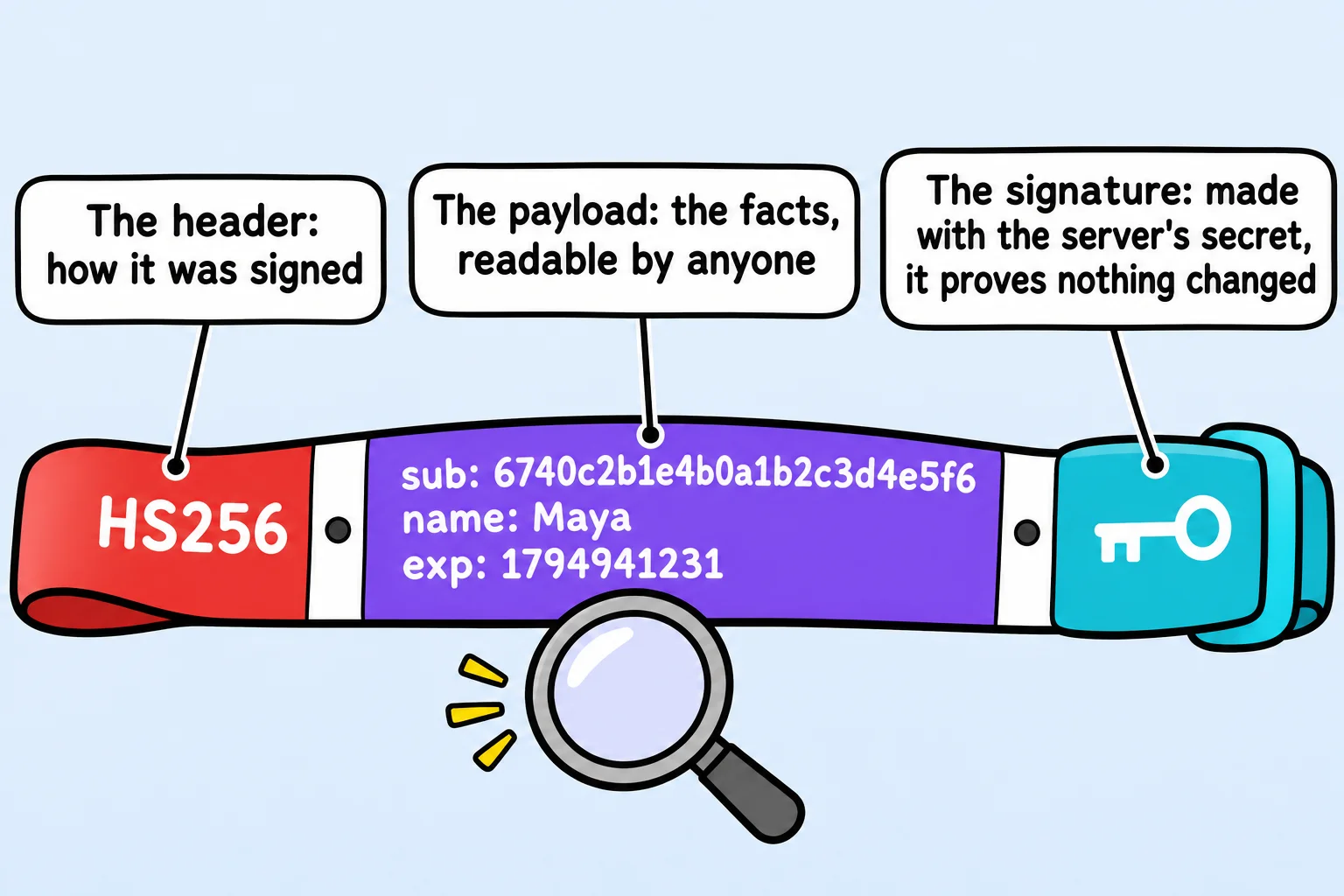
What a token can't hide
The header and the payload aren't encrypted. They're written in base64url, a way to write any data with letters, digits, - and _, so anyone who holds the token can read them, with no secret at all:
const token = "eyJhbGciOiJIUzI1NiIsInR5cCI6IkpXVCJ9.eyJzdWIiOiI2NzQwYzJiMWU0YjBhMWIyYzNkNGU1ZjYiLCJuYW1lIjoiTWF5YSIsImlhdCI6MTc5NDkzNzYzMSwiZXhwIjoxNzk0OTQxMjMxfQ.6k9Km3E7amhUyHAhXQ_ZR2JQtC9YMeL6WWGQrJoX6tY";

const [header, payload] = token.split(".");

console.log(Buffer.from(header, "base64url").toString());
console.log(Buffer.from(payload, "base64url").toString());
{"alg":"HS256","typ":"JWT"}
{"sub":"6740c2b1e4b0a1b2c3d4e5f6","name":"Maya","iat":1794937631,"exp":1794941231}
iat (issued at) and exp (expires) count seconds since January 1, 1970, the way JWTs write time, and they're an hour apart. So a token holds an id and a name, never a password, a hash or anything private. What the signature does stop is changes. Here a token's payload is swapped for one that adds role: "admin", and another token was made two hours ago:
import jwt from "jsonwebtoken";

const secret = process.env.JWT_SECRET;
const token = jwt.sign({ sub: "6740c2b1e4b0a1b2c3d4e5f6", name: "Maya" }, secret, { expiresIn: "1h" });

console.log(jwt.verify(token, secret).name);

const [header, , signature] = token.split(".");
const changed = Buffer.from(JSON.stringify({ sub: "6740c2b1e4b0a1b2c3d4e5f6", name: "Maya", role: "admin" })).toString("base64url");
try {
  jwt.verify(`${header}.${changed}.${signature}`, secret);
} catch (error) {
  console.log(`${error.name}: ${error.message}`);
}

const twoHoursAgo = Math.floor(Date.now() / 1000) - 2 * 60 * 60;
const old = jwt.sign({ sub: "6740c2b1e4b0a1b2c3d4e5f6", name: "Maya", iat: twoHoursAgo }, secret, { expiresIn: "1h" });
try {
  jwt.verify(old, secret);
} catch (error) {
  console.log(`${error.name}: ${error.message}`);
}
Maya
JsonWebTokenError: invalid signature
TokenExpiredError: jwt expired
jwt.verify gives back the payload of a good token, and throws for a changed or expired one.
Sending and checking it: the Authorization header
At sign-in, the study group's API now answers with a token instead of the student:
  const token = jwt.sign({ sub: user.id, name: user.name }, process.env.JWT_SECRET, { expiresIn: "1h" });
  res.json({ token });
The app keeps the token and sends it with each request, in the Authorization header: the word Bearer (whoever bears, or carries, the token), a space, then the token. req.get("Authorization") reads that header, and /me checks it:
function readToken(req) {
  const [scheme, token] = (req.get("Authorization") ?? "").split(" ");
  if (scheme !== "Bearer") {
    return null;
  }
  try {
    return jwt.verify(token, process.env.JWT_SECRET);
  } catch {
    return null;
  }
}

app.get("/me", async (req, res) => {
  const payload = readToken(req);
  const user = payload === null ? null : await findUserById(payload.sub);
  if (user === null) {
    return sendProblem(res, 401, "Sign in first.");
  }
  res.json({ id: user.id, name: user.name, email: user.email });
});
In a .http file, the header goes under the request line:
GET http://localhost:3100/me
Authorization: Bearer <the token from sign-in>
A sign-in, then /me with its token, with no token, and with one letter of the token changed:
POST /auth/sign-in
HTTP/1.1 200 OK
{"token":"eyJhbGciOiJIUzI1NiIsInR5cCI6IkpXVCJ9.eyJzdWIiOiI2YWZjOTQ1MjNiY2FjY2ExZDdhMDFlNzMiLCJuYW1lIjoiTWF5YSIsImlhdCI6MTc5NDkzNzkzOCwiZXhwIjoxNzk0OTQxNTM4fQ.kzGnCknSP9n638_6vSMSvv9PG3QMXDCX2DDCluftwvI"}

GET /me  (Authorization: Bearer and the token)
HTTP/1.1 200 OK
{"id":"6afc94523bcacca1d7a01e73","name":"Maya","email":"maya@example.com"}

GET /me  (no Authorization header)
HTTP/1.1 401 Unauthorized
{"status":401,"title":"Unauthorized","detail":"Sign in first."}

GET /me  (one letter of the token changed)
HTTP/1.1 401 Unauthorized
{"status":401,"title":"Unauthorized","detail":"Sign in first."}
Sessions or tokens?
| Session cookie | Token (JWT) | |
|---|---|---|
| Where who you are lives | On the server; the browser holds a random ticket | In the token itself, signed |
| How it's sent | By the browser, in a cookie, with no code | By the app, in the Authorization header |
| Signing out | Takes effect at once: the server throws the record away | The token works until it expires, unless the server keeps a list of refused tokens |
| Fits best | One website with its own server | APIs that phone apps, other servers or several servers share |
Tokens trade the instant sign-out for needing no shared memory, which is why they're kept short-lived: an hour here. This course uses tokens because its APIs are called by apps, tests and other servers. For a website that only serves its own pages, a session is the simpler choice, and often the safer one.
Do it: read what's inside a study group token
The study group's phone app wants to greet a student by name as soon as she signs in, without asking the server again. The name is already in her token's payload, readable with no secret, which is also why a token never holds anything private.
Your job: write readTokenPayload(token).
token: a JWT as text, three parts joined by dots: header, payload, signature.- Return the payload part as an object, with every field it holds.
- Ignore the header and the signature: reading needs no secret, and doesn't check the signature.
- The study group's payloads hold only letters, digits and JSON's punctuation, so the browser's
atobreads the payload part as it is.
Worked through: Priya's token is eyJhbGciOiJIUzI1NiIsInR5cCI6IkpXVCJ9.eyJzdWIiOiI2NzQwYzJiMWU0YjBhMWIyYzNkNGU1ZjciLCJuYW1lIjoiUHJpeWEiLCJpYXQiOjE3OTQ5Mzc2MzEsImV4cCI6MTc5NDk0MTIzMX0._2bykDy_q5iyi3x8641wwMfMaq_A38zUno0tBEnmWOs. Its middle part, between the two dots, is eyJzdWIiOiI2NzQwYzJiMWU0YjBhMWIyYzNkNGU1ZjciLCJuYW1lIjoiUHJpeWEiLCJpYXQiOjE3OTQ5Mzc2MzEsImV4cCI6MTc5NDk0MTIzMX0. atob turns it into the text {"sub":"6740c2b1e4b0a1b2c3d4e5f7","name":"Priya","iat":1794937631,"exp":1794941231}, so readTokenPayload returns { sub: "6740c2b1e4b0a1b2c3d4e5f7", name: "Priya", iat: 1794937631, exp: 1794941231 }.
Practiced live on the lesson page: write the JavaScript right there and check it.
Check yourself
2 questions to try on the lesson page.
So what
Sign-in hands out a wristband, every request shows it, and jwt.verify checks it: that's how nearly every API you'll call knows who's calling, and why nothing private ever goes inside one.