Type Hints: Saying What a Value Should Be
A type hint is a label on a variable, a parameter or a return value that says what kind of value belongs there, such as float, list[float] or a string that may be None, so people and tools can see what a function expects without reading its body.
Apprentice · Python · Updated
After this lesson you can
- Add type hints to a variable, a function's parameters and its return value, and explain that Python doesn't check them as it runs
- Write type hints for lists, dictionaries and values that may be None
Key takeaways
- A type hint names the kind of value that belongs in a variable, a parameter or a return value, so a reader knows what to pass in without reading the function's body.
- A hint for a collection names what's inside it too, list[float] for a list of floats and dict[str, int] for a dictionary whose keys are text and whose values are whole numbers.
- str | None, read "a string or None", is the hint for a value that may be missing, such as the answer when a member isn't on the list.
- Python doesn't check hints as the code runs, so a wrong value still goes in. A type checker such as mypy reads them without running anything.
You'll meet type hints the first time you open a library's documentation or a teammate's code and see a line such as def send_email(to: str, subject: str) -> bool:. VS Code shows them as you type a call, and web frameworks such as FastAPI read them to check what a request holds. Writing them on your own functions answers the question everyone who calls a function asks: what do I pass in, and what comes back?
The example is Peak Fitness, a gym with three membership plans: basic at $25.00 a month, plus at $40.00 and premium at $60.00.
What does this function want?
Here's a function from the gym's front desk. It works out what a member pays for a few months:
def membership_cost(price, months):
    return price * months


print(membership_cost(29.5, 3))
print(membership_cost("29.5", 3))
88.5
29.529.529.5
The first call gives the right answer. The second gets the price as text, "29.5" in quotes, the way a value arrives from input(), a form or a CSV file. * on text repeats it, so the function hands back 29.529.529.5 with no error at all: a wrong answer that looks a lot like a price.
Nothing in def membership_cost(price, months): says the price must be a number. To find out, you'd read the body, and in a long function that takes a while.
Type hints: a label on each blank
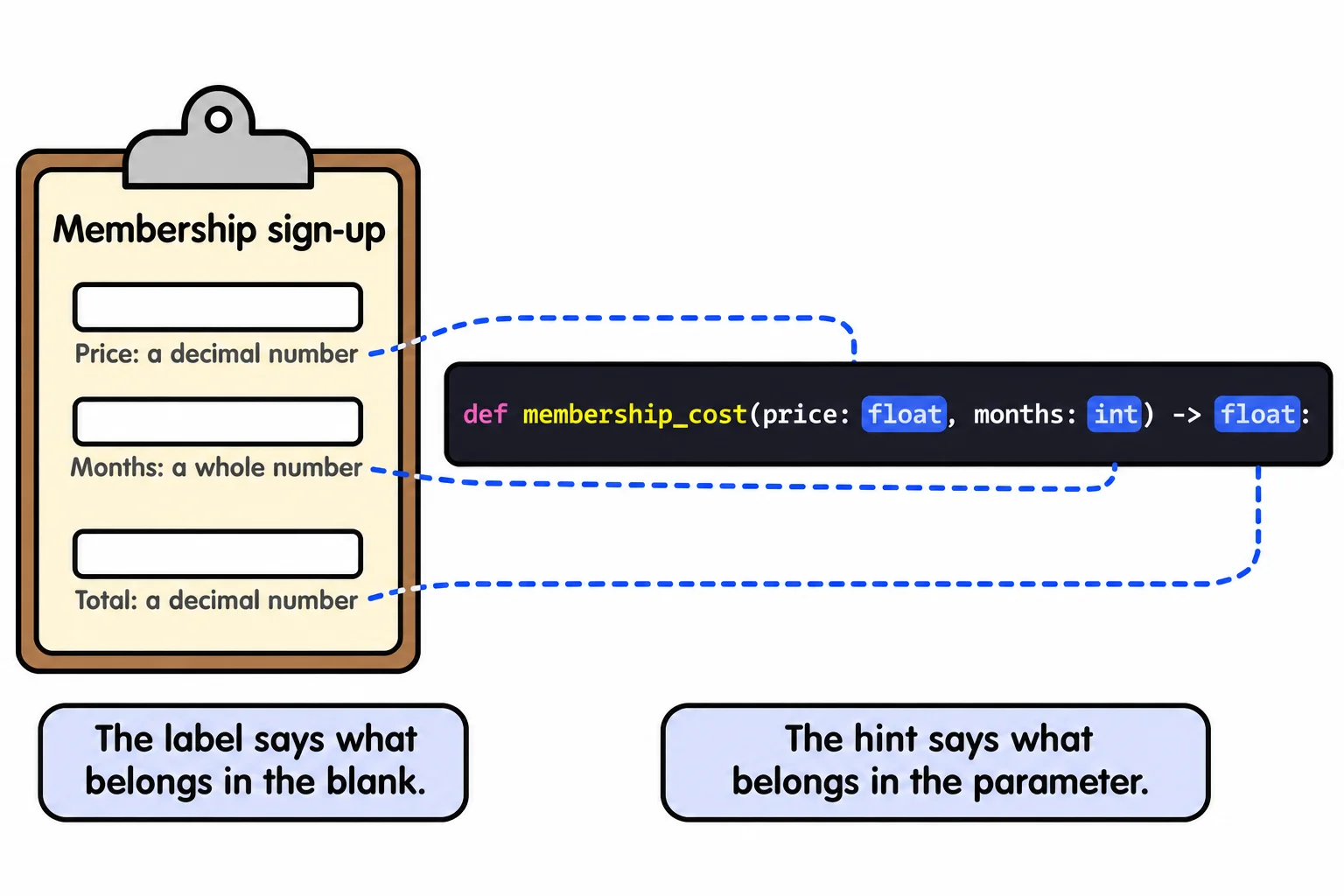
Think of a paper form. Each blank has a small label under it: Amount ($), Number of months. The label doesn't stop anyone writing nonsense, but it tells every reader what belongs there.
A type hint is that label for your code. (Some textbooks call it a type annotation.) It goes after a colon, and the return value's hint goes after ->, read "returns":
def membership_cost(price: float, months: int) -> float:
    return price * months


print(membership_cost(29.5, 3))
print(membership_cost("29.5", 3))
88.5
29.529.529.5
Read the first line aloud: "membership_cost takes a price, a float, and months, an int, and returns a float." The four basic hints are int (a whole number), float (a number with a decimal point), str (text) and bool (True or False). An int is fine where a float is hinted, since 30 is a price too.
Look back at the output, though: it's the same as before. Python doesn't check hints as the code runs. They're for people and for tools. VS Code shows them when you hover over a call, and a type checker such as mypy reads them without running anything, and points at the second call before a member ever sees 29.529.529.5.
A variable can have a hint too, written the same way:
member_name: str = "Rosa"
visits: int = 12
is_student: bool = True
print(member_name, visits, is_student)
Rosa 12 True
Most code hints its functions and leaves variables alone, because Python can tell a variable's type from the value it starts with.
Hints for lists and dictionaries
A list's hint names what's in it, in square brackets: list[float] is read "a list of floats". A dictionary's hint names its keys, then its values: dict[str, int] is read "a dict from str to int", text keys with whole-number values.
def average_visits(visits: list[int]) -> float:
    return sum(visits) / len(visits)


plan_prices: dict[str, float] = {"basic": 25.0, "plus": 40.0, "premium": 60.0}
weekly_visits: list[int] = [3, 4, 2, 5]
print(average_visits(weekly_visits))
print(plan_prices["plus"])
3.5
40.0
A variable's hint earns its place when the value doesn't say enough: checkins: list[str] = [] starts empty, and only the hint says it will hold names.
Maybe a value, maybe None
Some members rent a locker and some don't. A function that looks up a member's locker number has two possible answers: a number, or None, Python's value for "nothing here". Its hint says so with |, read "or":
def locker_for(name: str, lockers: dict[str, int]) -> int | None:
    if name in lockers:
        return lockers[name]
    return None


lockers: dict[str, int] = {"Rosa": 14, "Dev": 27}
print(locker_for("Rosa", lockers))
print(locker_for("Mia", lockers))
14
None
int | None is read "an int or None". Anyone who calls locker_for sees from the first line that the answer can be missing, and checks for None before using it as a number. A function that only prints and never returns a value is hinted -> None. In older code and some textbooks you'll see Optional[int], from the typing module: it means the same as int | None.
Do it: say which classes still have room
Peak Fitness's app shows how many spots are left in each class. The app's developers asked for a function whose first line says exactly what it takes and what it gives back.
class_name: the class to look up, as text, such as"spin".spots: a dictionary from each class's name to how many spots are left in it.
Your job: finish spots_left(class_name, spots), with type hints, so it returns how many spots are left in the class.
- Hint
class_nameasstr,spotsasdict[str, int], and the return value asint | None. - When the class is in
spots, return its number of spots, even when that's0. - When the class isn't in
spots, returnNone.
Worked through: with spots = {"spin": 4, "yoga": 0, "boxing": 12}, spots_left("spin", spots) returns 4. spots_left("yoga", spots) returns 0: the class is full. spots_left("pilates", spots) returns None, because Peak Fitness has no pilates class.
Practiced live on the lesson page: write the Python right there and check it.
Check yourself
2 questions to try on the lesson page.
So what
A function's first line, with its hints, tells every reader and every tool what goes in and what comes out, which is the start of catching a wrong value before it reaches a member's bill.