Getting an API Ready for a Host
A host is a computer that's always on at an address anyone can reach, and a FastAPI project is ready for one when its requirements.txt pins every package, a .python-version file names its Python, its start command runs uvicorn with --host 0.0.0.0 and --port $PORT, its settings come from environment variables, and a /health route says it's working.
Journeyman · FastAPI · REST API · Updated
After this lesson you can
- Prepare a FastAPI project for a host with pinned requirements, a .python-version file and settings read from environment variables
- Write a host's start command with uvicorn, --host 0.0.0.0 and --port $PORT, and explain what each part of it does
Key takeaways
- A host is someone else's computer that's always on, at an address anyone can reach. It builds your project from your files, so everything it needs must be written down in them.
- Pinned versions in requirements.txt and a .python-version file make the host install exactly what you tested with.
- On a host, uvicorn runs with --host 0.0.0.0, so it answers requests that come in over the network, and --port $PORT, the port the host chooses.
- The host has no .env file, so every setting comes from the environment variables you set on the host, and a /health route tells it the API is working.
Willow Creek Parks has a trails API: hikers ask it which trails are open, muddy or closed. It works on a laptop at http://127.0.0.1:8000, and that address means "this computer", so a hiker's phone at the trailhead can't reach it. Every API you want someone else to use has to move to a computer that's always on. This lesson gets the trails API ready for that move; Put Your API Online with Render makes it.
What a host does
A host is a computer someone else runs for you, always on, at an address anyone can reach. It's like renting a stall at the farmers market: the organizer keeps the lights on and puts your stall on the map, and you bring everything you sell. Putting your code there and starting it is called a deployment.
The host starts from your GitHub repository, not your laptop. It doesn't see your virtual environment, your .env file or anything you installed by hand, only the files you pushed. Then it runs two commands you give it:
- A build command, run once per deploy, which installs the packages:
pip install -r requirements.txt. - A start command, which starts the API and keeps it running.
So everything the API needs must be written down in the repository. The next three sections are the things a laptop never needed written down.
Pin what the host installs
On your laptop, FastAPI is the version you installed months ago. A line that says only fastapi makes the host install the newest version on deploy day, which may not be the one your tests passed with. Writing the exact version with == (read "equals equals") is called pinning, and every package in the trails API's requirements.txt is pinned:
fastapi[standard]==0.163.1
uvicorn==0.54.0
httpx==0.28.1
httpx2==2.16.2
pydantic-settings==2.16.3
pytest==9.2.0
Python itself needs the same care. A file named .python-version (read "dot python version"), in the project's top folder, holds one line: the Python the API runs on. Use the first two numbers that python --version prints on your computer:
3.15
Render reads this file and installs the newest release of that version. Without it, the host picks a Python of its own.
The start command: 0.0.0.0 and $PORT
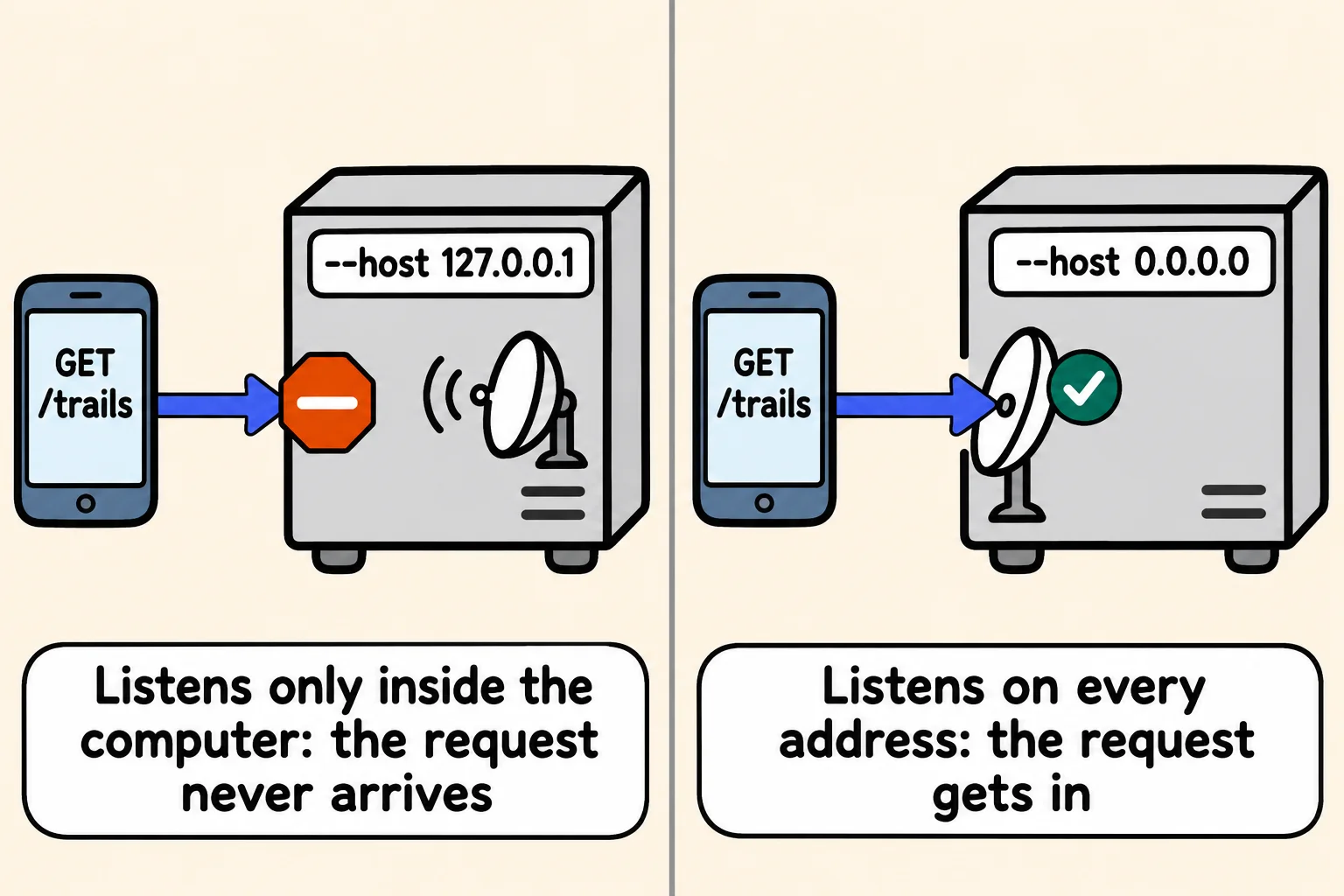
fastapi dev main.py is for your own computer: it restarts on every save and listens only at 127.0.0.1, the address a computer uses to talk to itself. A host starts the API with Uvicorn, the server FastAPI runs on, and this start command:
uvicorn main:app --host 0.0.0.0 --port $PORT
main:appis "theappobject inmain.py".--host 0.0.0.0(read "zero zero zero zero") makes the server listen on every network address the computer has. A server listening only at127.0.0.1would never hear the requests that reach the host over its network, and Render's docs say a web service must listen on0.0.0.0.--port $PORT(read "dollar port") uses the port the host chooses. The host puts the number in an environment variable namedPORT, and the$asks the host's terminal for its value.
You can try the start command on your computer. Set PORT first. In PowerShell, where $env:PORT (read "dollar env colon port") is how an environment variable is read:
$env:PORT = "3100"
uvicorn main:app --host 0.0.0.0 --port $env:PORT
On a Mac (zsh):
export PORT=3100
uvicorn main:app --host 0.0.0.0 --port $PORT
Uvicorn's own lines show the lifespan from Startup, Shutdown and a Health Check running, then the address it listens on:
INFO:     Waiting for application startup.
INFO main: Trails API started: ran migrations [1], added 6 demo trails
INFO:     Application startup complete.
INFO:     Uvicorn running on http://0.0.0.0:3100 (Press CTRL+C to quit)
http://127.0.0.1:3100/trails works in your browser. Windows may ask whether Python may use the network; your own browser reaches it either way. Stop it with Ctrl+C.
Settings from the environment, and a health route
The host has no .env file: it's in .gitignore, as it should be. So every setting comes from the environment, as Settings Checked at Startup set up with pydantic-settings. The trails API has two, each with a default, so it starts even when neither is set:
from pydantic_settings import BaseSettings, SettingsConfigDict


class Settings(BaseSettings):
    model_config = SettingsConfigDict(env_file=".env")

    database_path: str = "trails.db"
    log_level: str = "INFO"


settings = Settings()
A setting with no safe default, such as the JWT_SECRET an API with sign-in needs, has no default at all, so the app stops at startup when the host doesn't have it.
The last piece is a /health route, as Startup, Shutdown and a Health Check wrote: {"status":"ok"} with 200 when the database answers, 503 when it doesn't. The host calls it before it sends anyone to a new deploy.
Sources
- Render, Web Services: a web service must bind to a port on host 0.0.0.0, the port in the
PORTenvironment variable. - Render, Setting Your Python Version: a
.python-versionfile with only the first two numbers gets the newest release of that version.
Check yourself
2 questions to try on the lesson page.
So what
A project whose packages, Python, start command and settings are all written down runs the same on a host as on your laptop, and that's most of the work of putting an API online.