Requiring a Signed-In User
A requireUser middleware checks the token in a request's Authorization header before the route runs, puts the signed-in user in req.user, and answers 401 when the token is missing, made up or expired.
Journeyman · Node.js · REST API · Updated
After this lesson you can
- Explain the difference between authentication (who you are) and authorization (what you may do)
- Write a requireUser middleware that verifies the token in the Authorization header, sets req.user and answers 401 without a valid one
- Test a protected route with Supertest, signing in first and sending the token in the Authorization header
Key takeaways
- Authentication asks who you are, and authorization asks what you may do. An API answers the first question before the second.
- requireUser reads the Authorization header, verifies its token with jwt.verify, sets req.user and calls next(), so the route runs.
- A missing token, a made-up one and an expired one all get 401, read as "I don't know who you are; sign in first."
- Written once as middleware, the check goes in front of every route that needs it, so no route has to copy it.
- A test of a protected route signs in first, then sends the token with .set("Authorization", ...).
Every app with accounts has pages that only make sense once you've signed in: your orders, your messages, your team's tasks. The API behind them has to tell a signed-in person from a stranger who found the address before it answers. You'll write that check once, as middleware, and put it in front of every route that needs it.
Crew Board is a small team's task board. Its sign-in route works the way Tokens: Signing In with a JWT built it: Theo sends his email and password and gets back a token that says who he is (with his role inside too, for the next lesson). But the task list never asks for the token. A request with no token at all, GET http://localhost:3100/tasks, gets:
HTTP/1.1 200 OK
[{"id":1,"title":"Book the room for the sprint demo","ownerId":1,"done":false},{"id":2,"title":"Write the release notes","ownerId":2,"done":false},{"id":3,"title":"Fix the typo on the sign-in page","ownerId":3,"done":true}]
Anyone who finds the address can read the team's tasks.
Who are you, and what may you do?
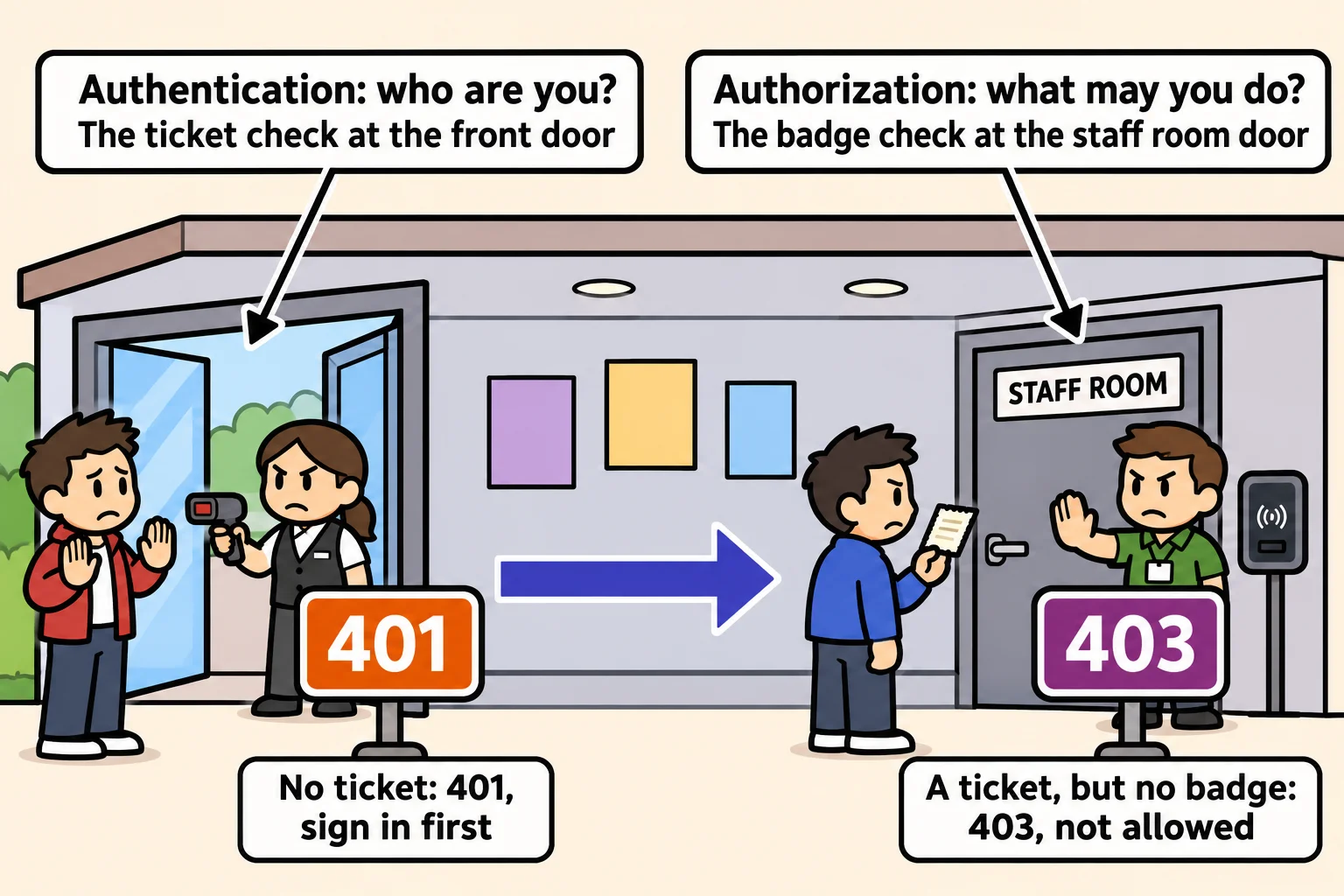
Think of a concert hall. At the front door, staff check your ticket. Inside, the staff room door checks something else, a staff badge. Your ticket got you in, but it doesn't open that door.
An API asks the same two questions, and they have names:
- Authentication is the front door: proving who you are. Crew Board's sign-in does it, and the token is the proof Theo carries afterward.
- Authorization is the staff room door: deciding what that person may do, such as whether Theo may delete a task.
Authentication always comes first, because you can't decide what someone may do until you know who they are. When it fails, the answer is 401 Unauthorized, read as "I don't know who you are; sign in first." This lesson builds that first check, and Roles and Ownership: 401 or 403 builds the second.
One check, written once
The check could go inside each route: read the header, verify the token, answer 401 when it fails. That's about ten lines, copied into each of Crew Board's four task routes and every route to come. The copies have to stay the same, and the route someone forgets to protect answers anyone, with no error to warn you.
Middleware fixes that. As Middleware: Code That Runs on Every Request showed, a middleware is a function (req, res, next) that runs before a route and either answers the request itself or calls next() to pass it on. Here's the check as a middleware, in its own file, auth.js:
import jwt from "jsonwebtoken";
import { sendProblem } from "./send-problem.js";

export function requireUser(req, res, next) {
  const [scheme, token] = (req.get("Authorization") ?? "").split(" ");
  if (scheme !== "Bearer" || !token) {
    return sendProblem(res, 401, "Sign in first.");
  }
  try {
    const payload = jwt.verify(token, process.env.JWT_SECRET);
    req.user = { id: payload.sub, name: payload.name, role: payload.role };
    next();
  } catch {
    sendProblem(res, 401, "That token isn't valid or has expired. Sign in again.");
  }
}
Line by line:
req.get("Authorization")reads the header. A signed-in request sendsAuthorization: Bearer <the token>("bearer" because whoever holds the token is treated as its owner), sosplit(" ")cuts it into the wordBearerand the token. With no header,??(read "nullish coalescing") gives""instead.- No
Bearer, or nothing after it: answer 401 andreturn, so nothing else runs.sendProblemis the course's one error shape, from Error Handling and Consistent Error Responses, kept in its own file,send-problem.js, so every file can import it. jwt.verifychecks the token's signature with the secret, and its expiry. It gives back the payload, or throws.req.useris a property the middleware adds to the request. The token'ssub(read "subject": whose token it is) becomesreq.user.id, so every function after this one knows who's asking.next()hands the request on to the route. Without it, the route never runs. (catchwith no(error)is fine when you don't need the error.)
A route that needs a signed-in user names the middleware before its own function, and Express runs them in that order:
app.get("/tasks", requireUser, (req, res) => {
  res.json(tasks);
});

app.get("/me", requireUser, (req, res) => {
  res.json(req.user);
});
With Theo's token, GET /me answers 200 and {"id":2,"name":"Theo","role":"member"}. With no token, it answers 401 and {"status":401,"title":"Unauthorized","detail":"Sign in first."}. To protect every route under one path at once, app.use("/tasks", requireUser) puts it in front of them all.
Missing, made up or expired
jwt.verify refuses a token for more than one reason. This program signs three tokens and tries four. Its secret is a practice one; a real secret comes from an environment variable.
import jwt from "jsonwebtoken";

const secret = "practice-secret-for-this-lesson";
const theo = { sub: 2, name: "Theo", role: "member" };
const anHourAgo = Math.floor(Date.now() / 1000) - 3600;

const good = jwt.sign(theo, secret, { expiresIn: "1h" });
const expired = jwt.sign({ sub: 2, name: "Theo", role: "member", exp: anHourAgo }, secret);
const forged = jwt.sign({ sub: 2, name: "Theo", role: "admin" }, "a-guessed-secret");

for (const token of [good, expired, forged, "made-up-token"]) {
  try {
    const payload = jwt.verify(token, secret);
    console.log("Valid:", payload.name, payload.role);
  } catch (error) {
    console.log(`${error.name}: ${error.message}`);
  }
}
Valid: Theo member
TokenExpiredError: jwt expired
JsonWebTokenError: invalid signature
JsonWebTokenError: jwt malformed
The expired token was real once, but its hour is up (exp is when it expires, in seconds). The forged one claims Theo is an admin, but it was signed with a guessed secret, so its signature doesn't match. The last isn't a token at all. To requireUser, all three mean the same thing: this request can't prove who sent it. Each gets 401, and the detail asks the client to sign in again, because a fresh token fixes all three.
Testing a protected route
A protected route needs at least two tests: one with no token, which should get 401, and one with a real token, which should get through. For a real token, the test file signs in first, in before, which runs once before the tests:
import { test, before } from "node:test";
import assert from "node:assert/strict";
import request from "supertest";
import { app } from "./app.js";

process.env.JWT_SECRET = "crew-board-test-secret";
let theoToken;

before(async () => {
  const response = await request(app)
    .post("/auth/sign-in")
    .send({ email: "theo@crewboard.test", password: "practice-theo" });
  theoToken = response.body.token;
});

test("GET /tasks with no token answers 401", async () => {
  const response = await request(app).get("/tasks");
  assert.equal(response.status, 401);
});

test("GET /me with Theo's token answers 200 with Theo", async () => {
  const response = await request(app)
    .get("/me")
    .set("Authorization", `Bearer ${theoToken}`);
  assert.equal(response.status, 200);
  assert.equal(response.body.name, "Theo");
});
.set("Authorization", ...) adds the header to Supertest's request. The file sets a practice secret of its own, so the tests don't need your .env file. Running npm test (your times will differ):
✔ GET /tasks with no token answers 401 (86.4733ms)
✔ GET /me with Theo's token answers 200 with Theo (4.6851ms)
ℹ tests 2
ℹ suites 0
ℹ pass 2
ℹ fail 0
ℹ cancelled 0
ℹ skipped 0
ℹ todo 0
ℹ duration_ms 344.7852
The pair catches the most common mistake: a route that forgot requireUser still passes the test with a token, but it fails the one without.
Check yourself
2 questions to try on the lesson page.
So what
Every protected route now asks for proof before it answers, and it asks in one place, so protecting the next route you add takes one word, requireUser, not ten copied lines.